Our Location
304 North Cardinal St.
Dorchester Center, MA 02124

If you’ve had a scare – a locked-out admin account, a defaced homepage, or a hosting email that just says “we’ve suspended your site for malware” – you already know why you’re here. You’re looking for the best WordPress security plugins before it happens again, not after.
You’re not overreacting. WordPress powers over 40% of the web, which makes it the single most attacked CMS on the internet. Bots don’t care how small your site is; they scan millions of URLs a day looking for the same weak logins and outdated plugins.

We looked at pricing pages, changelogs, and official plugin listings for the top contenders in this space. The result is a shortlist of the best WordPress security plugins for 2026 – what each one actually does, what it costs, and who it’s really built for.
Quick answer: For most sites, BruteFort is the best WordPress security plugin for locking down your login page specifically. It covers rate limiting, a hidden login URL, geo-blocking, and IP rules, all for free. If you also need malware scanning and a full firewall, pair it with Wordfence or MalCare below.
| Plugin | Best For | Price | Active Installs | Rating | Standout Feature |
|---|---|---|---|---|---|
| 1. BruteFort | Login & brute-force protection | Free | Under 10 | 5.0★ (3 reviews) | Custom login URL + geo-blocking + IP rules in one plugin |
| 2. Wordfence | All-in-one firewall & malware scanning | Free / Premium from ~$149/yr | 5,000,000+ | 4.7★ (4,986 reviews) | Real-time firewall rule updates |
| 3. Sucuri Security | Site hardening & post-hack cleanup | Free plugin / Firewall from ~$199/yr | 600,000+ | 4.2★ (384 reviews) | Security activity auditing + blacklist monitoring |
| 4. MalCare | Automated malware removal | Free / Paid from $149/yr | 200,000+ | 4.4★ (548 reviews) | One-click auto-clean, off-server scanning |
| 5. All-In-One Security (AIOS) | Free core, budget-friendly premium | Free / Premium from $70/yr | 1,000,000+ | 4.7★ (1,715 reviews) | Security strength meter + database hardening |
| Bonus: LogMate | Debug log viewing & error monitoring | Free | New plugin | No reviews yet | Unified PHP + JS error log viewer |
Install counts and ratings pulled live from each plugin’s WordPress.org listing on 2 September 2026. Wordfence’s 5 million+ installs, and Sucuri’s, MalCare’s, and AIOS’s six-figure-plus install bases, reflect a decade-plus of production use. BruteFort, at under 10 installs, simply doesn’t have that yet — we say that plainly rather than dress it up.
Picking the best security plugin for WordPress isn’t about which one has the longest feature list. It’s about matching a plugin’s strengths to the actual attack you’re most likely to face.
We reviewed each plugin’s official WordPress.org listing, current vendor pricing pages, and changelog history to confirm what’s actually included in the free tier versus what’s locked behind a paywall.
We also weighed active development (how recently each plugin shipped an update) and how each one handles the two most common threats: brute-force login attempts and malware infections.
Every entry below includes genuine downsides, not just a highlight reel. A plugin that’s perfect for a five-page brochure site can be the wrong plugin for a WooCommerce store handling live transactions, so we’ve flagged who each one is actually built for.
BruteFort is a focused WordPress security plugin built around one of the most common attack vectors on the platform: the login page. Instead of trying to be a firewall, a malware scanner, and a backup tool all at once, it does four things well: rate limiting, custom login URLs, geo-blocking, and IP restriction.

Best for: Any site owner who wants to stop brute-force login attempts and bot traffic without configuring a complex firewall.
Once activated, BruteFort locks out an IP after a set number of failed login attempts and shows a countdown until the account unlocks. It also lets you replace /wp-login.php with a custom slug of your choosing, so automated scanners hitting the default login URL get a 404 instead of a login form.
On top of that, you can block or allow logins by country – useful if your traffic (and your attacks) come from very specific regions – and maintain a permanent IP whitelist and blacklist that overrides the other rules.
It logs every blocked attempt in real time, so you can see exactly which IPs and countries are hammering your login page, then export those logs for a security audit.
Pros:
.htaccess or server access requiredCF-IPCountry header before falling back to IP geolocation)Cons:
Pricing: Free, with all current features (rate limiting, custom login URL, geo-blocking, and IP restriction) included at no cost.
Verdict: If your main headache is bots and brute-force attempts hitting /wp-login.php, BruteFort is the best WordPress security plugin for that specific job, and it’s free.
Wordfence is one of the most widely installed security plugins in the WordPress ecosystem, and for good reason. The free version alone includes a working web application firewall, a malware scanner, and login security tools that plenty of competitors charge for.

Best for: Site owners who want a single plugin to handle firewall rules, malware scanning, and login security together.
The firewall analyzes incoming traffic in real time and blocks known attack patterns before they reach your site, while the scanner compares your files against known-good versions to flag injected or malicious code. The free tier’s firewall rules and malware signatures arrive about 30 days after Premium users get them – which is the core trade-off you’re making by staying on the free plan.
Pros:
Cons:
Pricing: Free core plugin; Premium starts at roughly $149/year per site (confirm current pricing on Wordfence’s site, as tiers shift).
Verdict: If you want one plugin that covers firewall, scanning, and login security in a single dashboard, Wordfence is a strong pick. Just budget for Premium if you want current threat signatures.
Sucuri Security takes a slightly different approach than Wordfence. The free plugin itself is focused on hardening, auditing, and detection rather than blocking traffic at the edge – the actual firewall is a separate paid product.
Best for: Sites that want strong hardening and monitoring now, with the option to add a dedicated firewall/CDN later.
The free plugin logs security-relevant activity, monitors your core files for unauthorized changes, and runs remote malware scans through Sucuri’s SiteCheck scanner. It also checks whether your domain has landed on any blacklists – which matters enormously if you rely on search traffic or email deliverability.
Pros:
Cons:
Pricing: Free plugin; firewall/CDN platform plans start at roughly $199–$499/year depending on tier.
Verdict: A solid choice if you want a security plugin for WordPress that emphasizes hardening and clear audit trails, with a firewall available as a paid add-on when you’re ready for it.
MalCare leans hard into one specific promise: if your site does get infected, it can clean it automatically, without you touching a single file over FTP.
Best for: Site owners who want malware detection and removal to be as hands-off as possible.
Its scanner runs on MalCare’s own servers rather than yours, so a deep scan doesn’t slow down your live site – a real advantage over scanners that chew through server resources during a scan. On paid plans, if the automated cleaner can’t fully resolve an infection, MalCare’s team will manually fix it at no extra charge.
Pros:
Cons:
Pricing: Free detection-only tier; paid plans from $59/year (1 site) up to $499–$799/year for larger or WooCommerce sites.
Verdict: If “what happens after I get hacked” keeps you up at night more than “how do I stop the attack,” MalCare is the best plugin for WordPress security built specifically around fast, automated recovery.
All-In-One Security (AIOS) – the plugin previously known as All In One WP Security & Firewall – is proof that you don’t need a big budget to get a genuinely broad feature set. The free core covers login lockdown, database hardening, file-system protection, and a basic firewall; premium, from $70/year, adds malware scanning, country blocking, and priority support.

Best for: Budget-conscious site owners who want broad coverage without a single paid tier.
It includes brute-force protection with attempt limiting, two-factor authentication that integrates with WooCommerce, Elementor Pro, and bbPress login forms, and 404-detection that blocks IPs after repeated probing. A built-in security strength meter scores your setup and tells you exactly what to fix next, which is genuinely useful for beginners who don’t know where to start.
Pros:
Cons:
Pricing: Free core plugin; Premium starts at $70/year for malware scanning, country blocking, and priority support.
Verdict: For anyone specifically searching for the best free WordPress security plugin, AIOS’s free core remains one of the most complete options available – just know malware scanning is a premium feature if you need it.
LogMate, from the same developer as BruteFort, isn’t a security plugin in the traditional sense – it’s a debug log viewer.
We’re including it because “why does my site keep breaking” is a question that so often turns out to be security-adjacent. It could be a conflicting plugin update, a broken script injected by malware, or a silent PHP error quietly degrading your site.
Best for: Developers and site owners who are tired of FTP-ing into wp-content/debug.log every time something breaks.
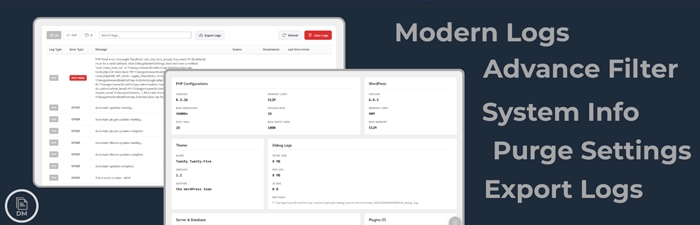
LogMate reads your WordPress debug log, PHP errors, and JavaScript console errors directly in your dashboard – no FTP or cPanel file manager required. It groups duplicate errors with an occurrence count and shows you whether an error came from WordPress core, a plugin, or your theme. You can also export logs by date range to send to a developer.
An auto-refresh option keeps the log view live while you’re actively debugging. One-click purge rules keep the log file from growing indefinitely.
Pros:
wp-config.php editing requiredCons:
Pricing: Free, with every current feature included.
Verdict: Not a replacement for any plugin above, but a genuinely useful companion once you’re trying to figure out what a security incident (or a bad update) actually broke.
You searched “best WordPress security plugin” expecting one clear winner, and instead got a dozen options that all claim to be it. That’s because the question itself is incomplete – a lightweight login protection plugin and a full malware scanner solve completely different problems.
| Category | Pick | Why |
|---|---|---|
| Login protection | BruteFort | Rate limiting, custom login URL, geo blocking, and IP management in one free plugin |
| Full-suite security | Wordfence | Mature firewall and malware scanner, capable free tier |
| Error logging & debugging | LogMate | PHP and JS error visibility from the dashboard, free |
| Backups | UpdraftPlus / BlogVault | Automated, offsite, widely used |
There’s no single best security plugin for WordPress that fits every site, and any listicle that tells you otherwise is oversimplifying. A five-page portfolio site and a WooCommerce store processing daily orders have completely different risk profiles.
If you’re choosing just one plugin, start with what you’re actually worried about. If it’s bots hammering your login page, start with BruteFort. If it’s “what happens if I actually get hacked,” MalCare or Sucuri’s cleanup tools matter more than a hidden login URL.
Many site owners end up running one login-focused plugin alongside one scanning-focused plugin, since very few single plugins do both well. That layered approach is usually how you get to genuinely better WordPress security, rather than a false sense of it from a single tool.
Keep it lean. Running multiple full-suite security plugins at the same time creates conflicts, especially on the login endpoint where both might try to enforce their own rate limiting. Two focused plugins covering different layers — like BruteFort for login and a separate malware scanner — works better than two all-in-one plugins fighting over the same functions.
No. Keeping WordPress core, plugins, and themes updated is the single highest-impact security practice available. Security plugins add protection around known attack vectors; they don’t patch vulnerabilities in outdated code. Update discipline plus a login protection plugin together cover most real-world WordPress attack scenarios.
For most sites, yes. BruteFort and LogMate are both fully functional at no cost. Premium tiers for full-suite plugins add real-time threat intelligence and current malware signatures — meaningful for high-value sites, less so for a typical small business or personal site where login protection and update hygiene cover most of the practical risk.
Login protection. It addresses the single most common attack type on WordPress sites, takes minutes to configure, and adds negligible overhead. BruteFort covers it for free — start there, then add error logging and backups as your next two priorities.
For most WordPress sites in 2026, BruteFort is the best plugin for WordPress security if your priority is shutting down brute-force and bot login attempts for free. It pairs cleanly with a scanning-focused plugin like Wordfence or MalCare for full coverage.
If you’re troubleshooting a site that’s already acting up, LogMate is worth adding purely to see what’s actually happening under the hood.
Related reading: check out BruteFort’s full feature breakdown and LogMate’s feature list for a closer look at either plugin, or head to the BruteFort blog for more WordPress security guides.

