Our Location
304 North Cardinal St.
Dorchester Center, MA 02124

You want your WordPress login page locked down, but you’re stuck choosing between an all-in-one plugin like Wordfence and a lighter, login-only tool. Install the wrong one and you either waste server resources or leave a gap in coverage.

That’s a reasonable thing to get stuck on. Wordfence and a dedicated login protection plugin solve overlapping but different problems, and most comparisons don’t say so plainly.
Here’s a concrete data point: the vast majority of WordPress attacks target wp-login.php specifically, not random files or plugin vulnerabilities. That’s exactly why a login-only tool can hold its own against a full security suite for that one job.
This comparison breaks down what each approach actually covers, where they overlap, and how to decide which one fits your site.
Quick Answer: If login attacks are your main concern and you’re on shared hosting, a dedicated login protection plugin like BruteFort covers rate limiting, lockout, custom login URLs, and geo blocking for free with minimal overhead. If you also need malware scanning and firewall coverage, Wordfence’s broader — but heavier — feature set is worth the trade-off.
| Feature | Wordfence (Free) | BruteFort (Free) |
|---|---|---|
| Login rate limiting | Yes | Yes |
| IP lockout after failed login | Yes | Yes |
| Custom login URL | No | Yes |
| Geo blocking (login) | Premium only | Yes |
| IP whitelist/blacklist | Yes | Yes |
| Login attempt logs | Yes | Yes |
| Malware scanning | Yes (delayed sigs on free) | No |
| Web application firewall | Yes (delayed rules on free) | No |
| File integrity monitoring | Yes | No |
| Performance overhead | Moderate to high | Minimal |
Wordfence is genuinely comprehensive. Its feature set includes a web application firewall, malware scanning against known threat signatures, real-time threat intelligence, login security with rate limiting and two-factor authentication, live traffic monitoring, and blocking by IP and country. It’s one of the most mature products in the WordPress security ecosystem, with a large, active support community.
The catch is that comprehensive coverage requires resources. Wordfence’s malware scanner reads your files. Its firewall intercepts every request. Its traffic monitoring writes data continuously. On shared hosting with limited CPU and memory, that adds up to measurable overhead. Its premium tier — which includes real-time firewall rules and the most current malware signatures — adds a subscription cost too.
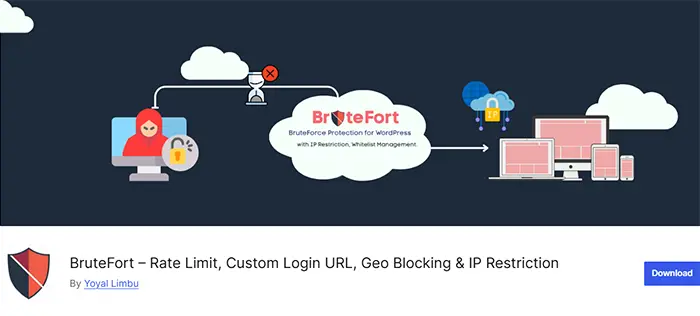
A focused WordPress brute force protection plugin like BruteFort does one thing: protect your login page. It handles rate limiting to cap failed login attempts, IP lockout after repeated failures, a custom login URL to hide the page from automated scanners, geo blocking to filter login access by country, and IP whitelist/blacklist management. It reads your login logs and nothing else — no file scanning, no traffic interception, no continuous background processing.
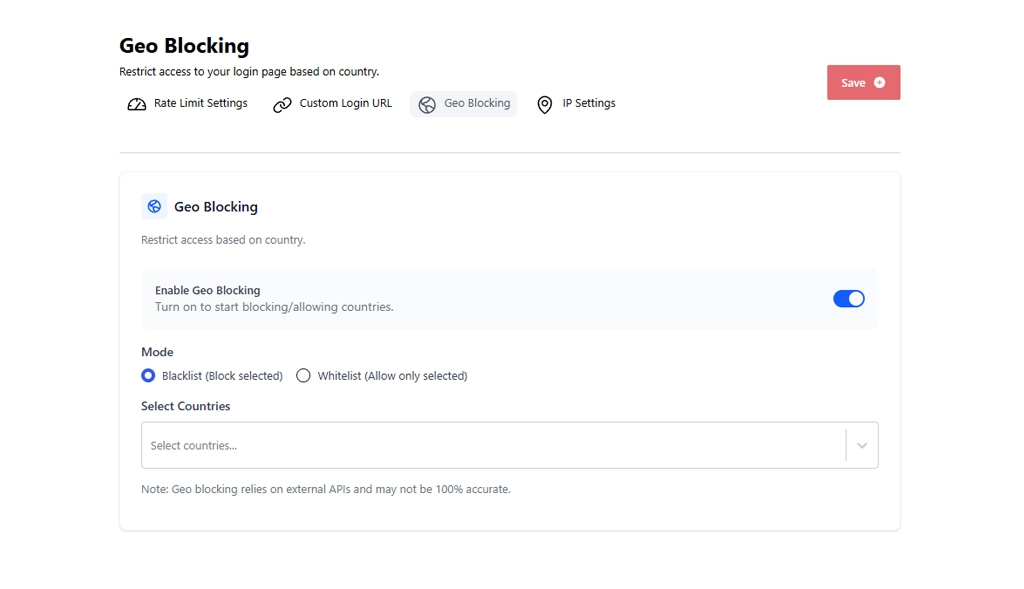
The geo blocking feature is worth a second look. It’s one of the settings Wordfence locks behind its premium tier, but BruteFort includes it free — toggle it on, choose whitelist or blacklist mode, and select countries.
The trade-off is scope. BruteFort doesn’t scan for malware, doesn’t provide a web application firewall, and doesn’t monitor file changes. If your site gets compromised through a plugin vulnerability rather than a login attack, login protection alone won’t catch it.
It’s also worth noting the two approaches aren’t mutually exclusive. Some site owners use a lightweight login protection plugin for login-specific coverage and add malware scanning separately through a minimal scanner, rather than running a full-suite plugin that handles both.
In most cases yes, but there’s potential for overlap and occasional conflict on the login endpoint. If you run both, disable Wordfence’s login rate limiting to let BruteFort handle it. Two systems enforcing limits on the same login page can produce unexpected behavior. BruteFort handles the login layer; Wordfence handles malware and firewall coverage.
Wordfence free includes login rate limiting and IP blocking, but geo blocking and real-time IP reputation checks require a premium subscription. BruteFort’s full login protection stack — including geo blocking and custom login URL — is available for free.
For most small sites, yes. The vast majority of WordPress attacks target the login page. Rate limiting, a custom login URL, and IP management cover those attack vectors completely. Keep plugins and themes updated and use strong passwords, and login protection handles the remaining meaningful attack surface.
BruteFort, by a wide margin. It only runs logic against login requests, so there’s no ongoing file scanning or full-traffic firewall inspection to slow down regular page loads. Wordfence’s broader feature set means more background processing on every request, which shows up most on shared hosting with limited resources.
Neither approach is universally right. Full-suite plugins offer more coverage; dedicated login protection plugins offer less overhead and more precise control of the most commonly attacked surface. BruteFort covers the login layer completely for free — whether you use it alongside a scanner or on its own depends on your site’s risk profile and hosting environment.
You might also like:

