Our Location
304 North Cardinal St.
Dorchester Center, MA 02124


A brute force attack is exactly what it sounds like: an attacker — almost always a bot — tries to log in to your WordPress site by guessing passwords. Not creatively. Not cleverly. Just over and over, thousands of times, until something works.
Picture someone trying every key on a giant keychain against your front door, one after another, without pausing. That’s a brute force attack, except the “door” is your WordPress login page and the “keys” are millions of leaked passwords.
Quick Answer: A brute force attack is an automated, repeated password-guessing attack against your login page. WordPress has zero built-in protection against it. Rate limiting and a custom login URL — both included in BruteFort — stop it completely.
It’s one of the oldest attack methods on the internet, and it’s still one of the most common on WordPress specifically. Why? Because every WordPress site’s login page sits at the same predictable URL by default. No reconnaissance needed — the bot already knows where to look.
The attack itself is simple. A bot sends POST requests to /wp-login.php with a username and password. WordPress checks the credentials, returns a failure, and the bot tries the next combination. Repeat, at hundreds or thousands of attempts per minute.
Most bots start with the username admin — the WordPress default that a huge percentage of older sites still use. From there, they cycle through password lists that range from common choices like “password123” to massive databases of passwords from previous data breaches.
Here’s the thing: WordPress doesn’t slow them down. There’s no built-in limit on how many times someone can attempt a login. No lockout after failed attempts. No alert that anything unusual is happening. The bot can run indefinitely without any friction unless you add it yourself.
If the attack succeeds and an attacker gets admin access to your WordPress site, the consequences are serious. They can install malware, redirect your traffic, steal customer data, add your site to a spam network, or simply destroy content.
Cleanup is expensive and time-consuming — and some hosting providers will take your site offline entirely if they detect malicious activity coming from it. Even a failed attack has a cost. Thousands of login requests put load on your server, and shared hosting plans are particularly vulnerable to slowdowns from attack traffic.
Two things make brute force attacks impractical: limiting attempts and hiding the target.
BruteFort covers both from a single plugin; here’s how each piece works.
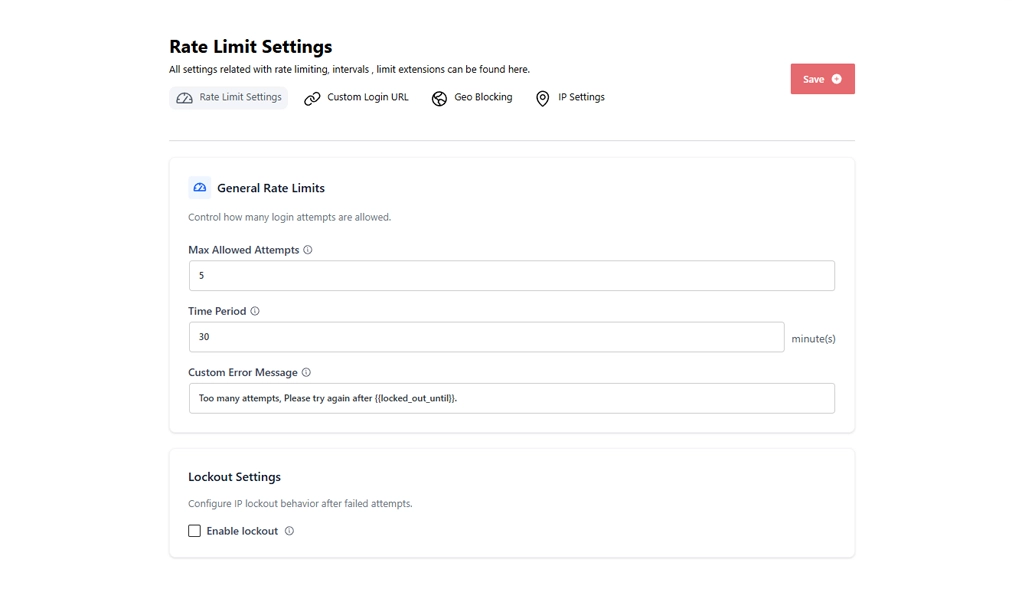
A rate limit says: after X failed login attempts from the same IP within Y minutes, block that IP temporarily. In BruteFort’s Rate Limit Settings, you set the max allowed attempts and the time window yourself, and the lockout enforces automatically — turning a viable attack into an impossible one. A bot that can only try 5 passwords per 30 minutes would need years to test even a modest list. You can also customize the error message shown to blocked IPs — the {{locked_out_until}} variable inserts the exact time the lockout expires.
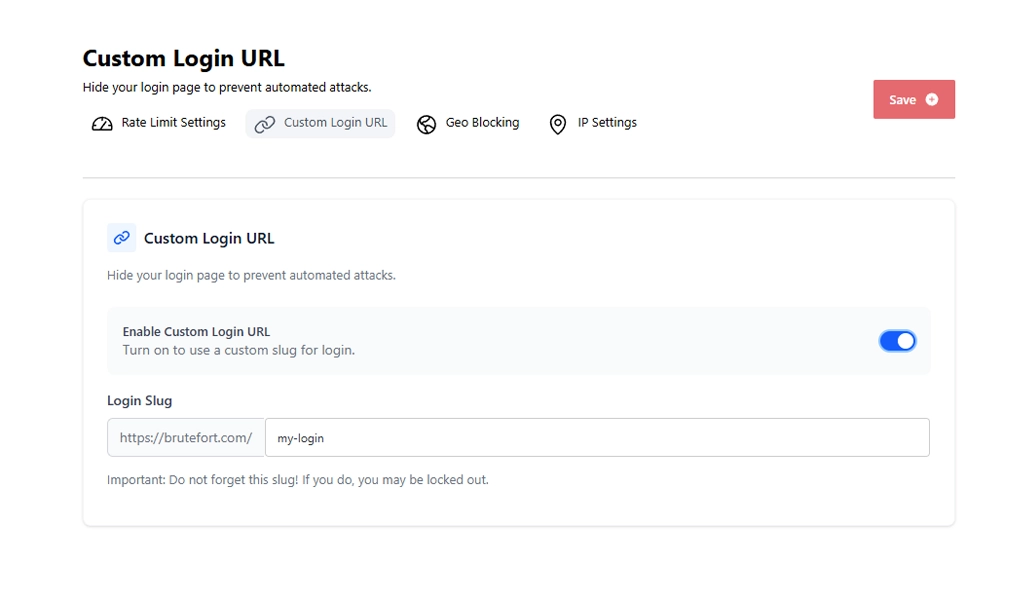
Bots attack /wp-login.php because that’s where WordPress logins always live. Change that URL to something unpredictable, and bots scanning for the default path hit a dead end. BruteFort’s Custom Login URL feature lets you set a custom slug in seconds. The default URL stops responding, and only users who know the new path can access the login form at all.
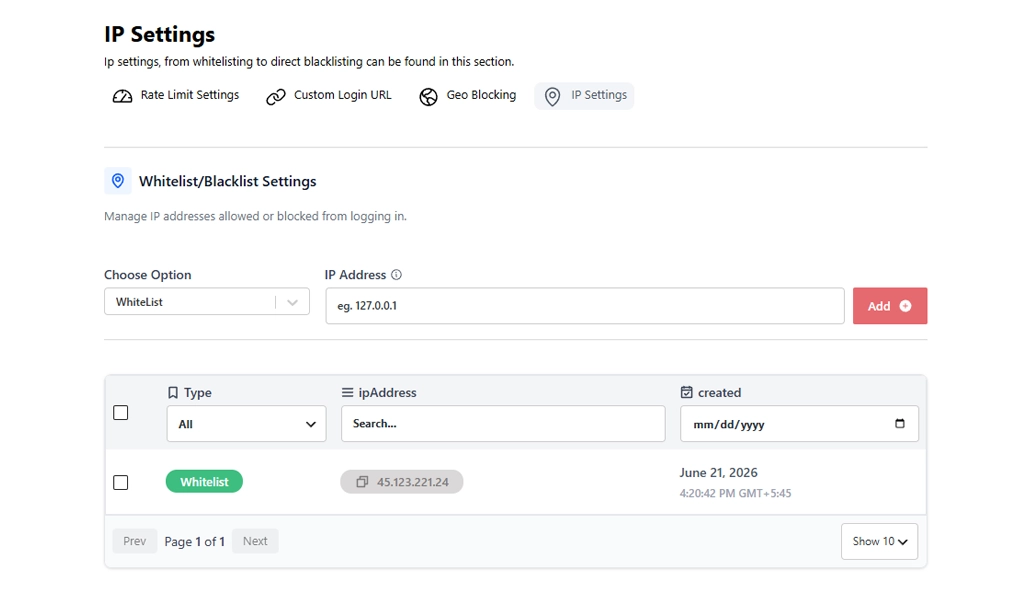
For IPs that keep coming back, a permanent block is cleaner than repeated temporary lockouts. BruteFort’s IP Settings tab lets you manually blacklist specific addresses, or whitelist trusted IPs so they’re never affected by rate limiting at all. The Logs section shows you which IPs have triggered lockouts, making it easy to identify the worst offenders.
Rate limiting, a custom login URL, and IP management — all three live inside a single BruteFort settings panel, no code required.
The most direct way is to check your login logs. BruteFort records every lockout with the triggering IP, the number of failed attempts, and the timestamp. Unusual server slowdowns — especially during off-hours — can also indicate attack traffic hitting your login page. Some hosting providers surface this in their dashboards as unusual request spikes.
A strong, unique password makes a successful attack much less likely, but it doesn’t stop the attempts. A bot will still hammer your login page for hours — consuming server resources and generating noise in your logs — even if it never succeeds. Rate limiting stops the attempts themselves, regardless of password strength.
Some hosts offer firewall-level rate limiting or login protection, but it varies widely. Many shared hosting environments have no such protection. Even when your host provides some coverage, plugin-level rate limiting gives you direct control over the thresholds, lockout behavior, and error messaging — without relying on your host’s configuration.
Yes. BruteFort’s core features — including rate limiting, custom login URL, and IP management — are available in the free version. Install it from your WordPress plugins dashboard and configure the settings in under five minutes.

Brute force attacks are relentless but entirely preventable. Rate limiting makes them impractical. A custom login URL makes your site invisible to the scanners that find targets in the first place. Together, they handle the vast majority of automated attack traffic with no ongoing effort required. BruteFort sets both up from a single plugin panel.
If this helped, follow us for more WordPress security guides. You might also like:

