Our Location
304 North Cardinal St.
Dorchester Center, MA 02124


Right now, a bot somewhere is trying username and password combinations against your WordPress login page. It doesn’t need to know you exist — automated scanners hit millions of sites this way, and without a brute force protection plugin, WordPress puts up zero resistance.
That’s not a scare tactic; it’s just how the default login form works. A WordPress brute force protection plugin fixes it by adding rate limiting, IP lockout, and login page obfuscation that WordPress doesn’t ship with. Here’s what to look for when choosing one, what each feature actually does, and how BruteFort covers it.
Quick Answer: A solid brute force protection plugin needs five things — rate limiting, a custom login URL, IP whitelist/blacklist management, geo blocking, and a login log. BruteFort covers all five in one free plugin, so you’re not stitching together three separate tools to get full coverage.
BruteFort covers everything on this list from a single settings panel — here’s what each part looks like in practice.
This is the core function: track failed login attempts from a single IP within a defined time window, then block that IP once it crosses a threshold. BruteFort lets you set the max allowed attempts and the time period yourself — 5 attempts per 30 minutes by default. Once the threshold hits, the IP is locked out and sees a customizable error message, including the {{locked_out_until}} variable that tells them exactly when access is restored.
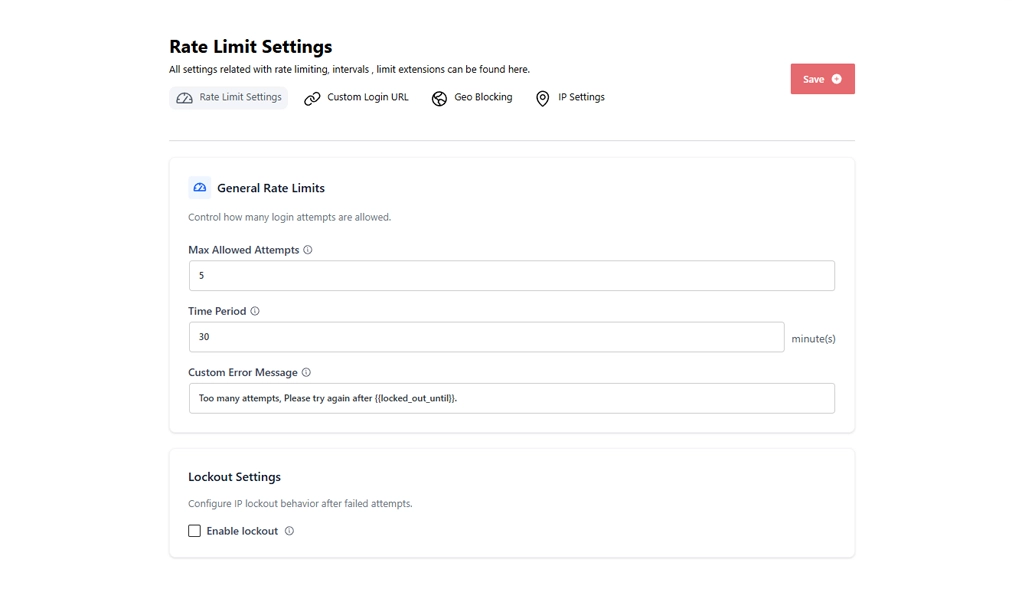
BruteFort’s Custom Login URL moves the login page away from /wp-login.php from the settings panel, no code required — removing your site from the automated bot sweeps that specifically target WordPress’s default path. A bot scanning for /wp-login.php just gets a 404 and never reaches the login form at all. It’s one of the highest-impact single changes you can make against WordPress login security threats.
Beyond temporary rate limit windows, a good plugin should let you permanently blacklist persistent offenders and whitelist trusted IPs so they’re never affected by lockout rules.
BruteFort’s IP Settings tab handles both, with a searchable, filterable table of entries, date-stamped and type-labeled. The Logs screen shows which IPs have triggered lockouts, so it’s easy to spot the ones that merit a permanent blacklist entry.
Country-level filtering adds another layer before rate limiting even fires. BruteFort’s Geo Blocking supports both blacklist mode (block selected countries) and whitelist mode (allow only selected countries), powered by external geolocation APIs.
For sites with a known user geography, whitelist mode is particularly powerful — one setting that blocks login traffic from everywhere except the countries your users are actually in.

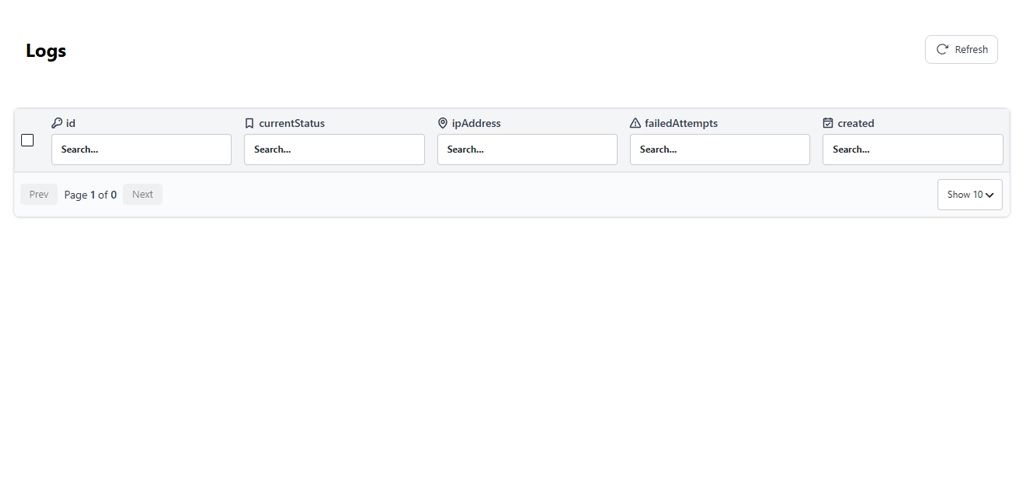
Visibility into what’s actually being blocked matters. BruteFort’s Logs screen records every lockout with the triggering IP address, failed attempt count, current status, and timestamp.
This serves as both an audit trail and a tool for identifying IPs worth escalating to a permanent blacklist entry.
Warning: plugins that only do one thing create gaps. Limit Login Attempts Reloaded handles rate limiting but not custom login URLs or geo blocking. WPS Hide Login handles URL obfuscation but not rate limiting. A single plugin covering all the layers is cleaner and avoids configuration gaps between tools.
Note: avoid running a heavy full-suite security plugin just for its login features. If brute force protection is your only real need, a resource-intensive all-in-one plugin wastes server resources and adds configuration complexity you don’t need. A focused plugin handles login protection more efficiently.
Strong passwords make a successful attack much harder, but they don’t stop the attempts. A bot will still hammer your login page thousands of times — consuming server resources, filling your logs with noise, and occasionally succeeding through credential stuffing using real leaked passwords. Rate limiting stops the attempts themselves, regardless of password strength.
A focused plugin like BruteFort adds negligible overhead. It only activates on login page requests — a tiny fraction of your total traffic. It doesn’t scan files, intercept all requests, or run background processes, so the performance impact on your general site traffic is effectively zero.
Yes. All of BruteFort’s features — rate limiting, custom login URL, geo blocking, IP whitelist/blacklist management, and login logs — are available at no cost. Install it directly from the WordPress plugin repository.
BruteFort protects the WordPress authentication endpoint, which WooCommerce uses for its login forms. Customers logging in through the WooCommerce My Account page authenticate through WordPress’s login system, so BruteFort’s rate limiting and lockout rules apply to those attempts too, not just direct admin logins.
A WordPress brute force protection plugin is the most direct defense against the most common WordPress attack type. BruteFort covers the full stack — rate limiting, custom login URL, geo blocking, IP management, and login logs — in a single free plugin that adds minimal overhead to your site.
You might also like:

