Our Location
304 North Cardinal St.
Dorchester Center, MA 02124


You just installed WordPress, or you’ve been running it for years, and you’re wondering the same thing: is this actually safe out of the box, or am I exposed without knowing it? Most site owners never stop to ask.
Fair question, and it deserves a straight answer. WordPress core has a dedicated security team, patches vulnerabilities fast, and builds SQL injection and XSS protections directly into its APIs. That part is genuinely solid.
Quick Answer: WordPress core is reasonably secure, but the default configuration leaves real gaps — no login rate limiting, no lockout, and debug settings that can leak server details if misconfigured. Closing them takes about 20 minutes with a couple of focused plugins.
Below is an honest look at what WordPress gets right, where the default install falls short, and exactly what closes each gap.
The WordPress core team maintains a dedicated security team and releases updates frequently. SQL injection and cross-site scripting protections are built into core APIs — as long as plugin and theme developers use those APIs correctly.
User roles and permissions are well-structured. Password hashing uses a solid algorithm. HTTPS support is standard. A default WordPress installation isn’t the easy target it used to be in its early years.
Every WordPress site has its login page at /wp-login.php. Automated bots scan for this path constantly and hit it with credential-stuffing and brute force attacks.
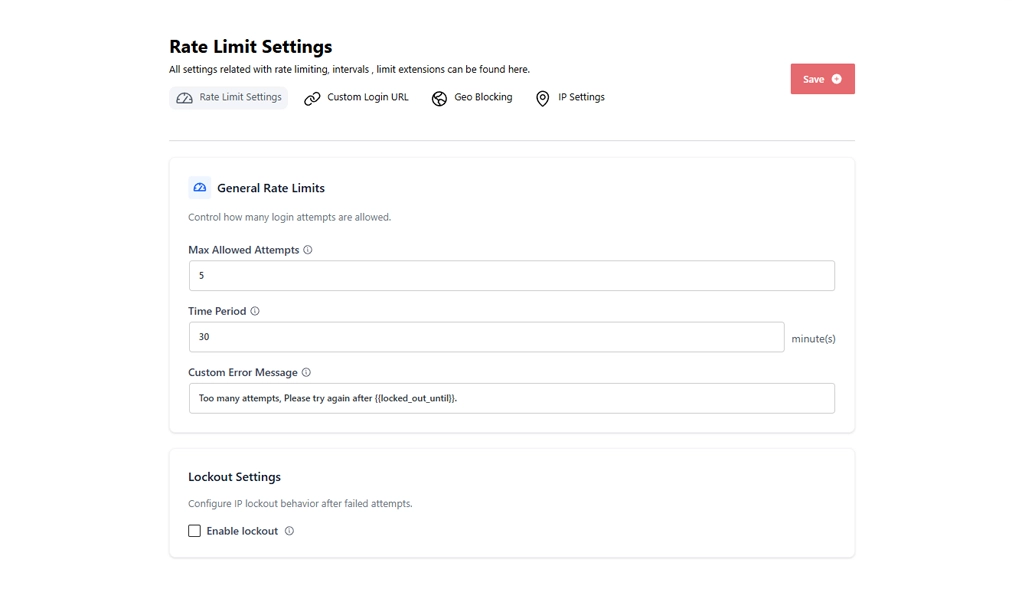
WordPress has no rate limiting built in — a bot can try thousands of passwords without any pushback. This is the single largest practical security gap in a default WordPress setup.
WordPress allows unlimited failed login attempts from the same IP address. There’s no lockout, no CAPTCHA trigger, no slowdown after repeated failures.
It’s a deliberate design choice — WordPress leaves this to plugins and server configuration. But it means the default install is genuinely vulnerable to automated attacks. A plugin like BruteFort closes this with a simple rate-limit panel: set the max attempts and the time window, and it handles the rest.
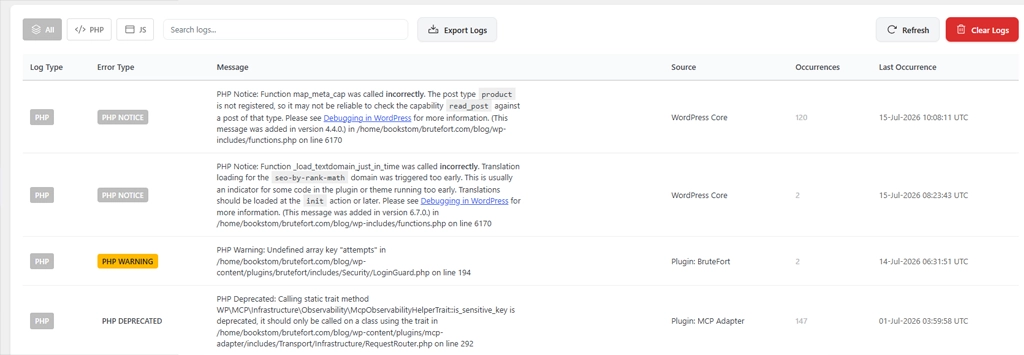
If WP_DEBUG and WP_DEBUG_DISPLAY are both enabled on a live site, PHP errors print directly to the page. This can expose file paths, function names, and database structure to anyone visiting the site.
Warning: The default for WP_DEBUG_DISPLAY is off, which is correct. But it’s easy to enable carelessly during development and forget to turn off before launch.

The vast majority of WordPress security incidents don’t come from WordPress core — they come from plugins and themes. A poorly maintained plugin with an unpatched vulnerability is an open door regardless of how well you’ve configured everything else.
This isn’t a default-configuration problem specifically, but it’s a practical reality of running any WordPress site: your security is only as strong as your least-updated plugin.
The good news: the most exploitable default gaps are easy to address.
BruteFort closes the two most exploitable gaps below — rate limiting and the login URL — from one panel, no code required.
/wp-login.php path, removing your site from automated bot sweeps entirely.WP_DEBUG_DISPLAY is false on any live site. Use Logmate to read error logs inside the dashboard without needing to enable display errors.Note: For the debug-log gap, Logmate reads your PHP error log right inside the dashboard — no FTP or hosting file manager required.
WordPress is more frequently targeted, but that’s largely because it powers a significant portion of the web — making it a more attractive target for automated attacks that don’t care which sites they hit. The core software is comparable in security to other major CMSes. The risk comes from its plugin ecosystem and default configuration gaps, both of which are manageable.
For most sites, one focused plugin that handles login protection is enough to close the biggest gaps. Full-suite security plugins that do file scanning, malware detection, and traffic monitoring are useful for high-traffic or high-value targets, but they add overhead. BruteFort is a lightweight option that specifically addresses the login attack surface without the bloat of an all-in-one security suite.
Usually yes — managed hosts typically add firewall rules, automatic core updates, and sometimes login protection at the server level. But the scope and quality varies significantly between providers, and server-level protection doesn’t eliminate the need for application-level security. Login rate limiting via a plugin is still worth having regardless of your hosting environment.
Common signs include unexpected admin users appearing, unfamiliar files in your theme or plugin directories, your site redirecting visitors to other URLs, or hosting alerts about unusual resource usage. BruteFort’s logs will show you historical login attack activity. Logmate’s error log will often surface unusual PHP activity that can indicate malicious code running in your environment.
WordPress is solid software with an active security team. But a default installation has real gaps — particularly around login protection — that take minimal effort to close. BruteFort handles the login attack surface, and Logmate keeps your error log visible so you catch problems early. Together they cover the two most commonly exploited gaps in a standard WordPress setup.
If this was helpful, follow us for more WordPress security and maintenance guides. You might also like:

